
Carter's Mac Utilities
The small Mac utilities you reach for, in one tiny menu bar app.
Keep Awake, keyboard Cleaning Mode, drive ejecting, storage and a color picker, all from one menu bar icon. Native, free and open source, using about 13 MB of memory and no CPU while idle.
Requires Apple Silicon Mac (M1 or later), macOS 27 or later.
Version 1.0 · macOS · MIT license · Released November 2026
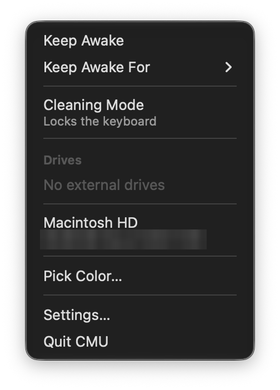
5 utilities, one menu.
Keep Awake
Keeps your Mac awake so apps and downloads keep running, while the display can still sleep. Pick a time, or keep it on until a set time. It turns itself off at a battery level you choose (10% by default).
Cleaning Mode
Locks the keyboard so you can wipe it down. The trackpad still works, so click the menu bar icon to unlock, or let it unlock on its own after a minute.
Drives
Every external drive, disk image and network drive with its free space. Click to eject, and you get a notification when it's safe to unplug.
Storage
Free space on your Mac, the same number Finder shows.
Color Picker
Pick any color on screen and copy it as HEX, RGB or HSL.
Install
- Download the latest
CMUzip from the GitHub releases page and unzip it. - Drag Carter's Mac Utilities into your Applications folder.
- Open it. macOS will say it can't verify the developer, because the app isn't notarized yet (that needs a paid Apple Developer account). Click Done, then go to System Settings → Privacy & Security, scroll down, and click Open Anyway. You only need to do this once per version.
- The sliders icon appears in your menu bar. CMU adds itself to your login items, and you can turn that off in Settings → General.
Open Settings… from the menu to turn utilities on or off, reorder them, change options, and record keyboard shortcuts.
Cleaning Mode asks for Accessibility permission the first time you use it. macOS requires that for any app that blocks key presses.
Lightweight by design
- Utilities you turn off are never loaded. No timers, no observers, no hooks.
- Nothing polls. The menu is only built when you open it.
- The keyboard hook only exists while Cleaning Mode is on, and the battery watch only while Keep Awake is on.
- There's no auto-updater, to keep it light. To update, download the new release and replace the app in Applications.
Good to know
- Cleaning Mode can't block the power button or Touch ID.
- Closing the lid still sleeps the Mac while Keep Awake is on. Keeping it awake with the lid closed would need admin-level system changes, which CMU deliberately avoids.
- To uninstall, quit CMU from its menu and delete it from Applications. Quitting turns off everything it was doing.
Open source
CMU is free and open source under the MIT license. The code is on GitHub, and adding a new utility only takes one Swift file.
